Compiling and Simulating Networks
SNS-Toolbox is designed with two goals: designing networks with a simple scripting system, and simulating these networks in an efficient manner. In Building Networks we covered the different options available when designing a network, here we will walk through the backend interface and how to simulate SNS networks using SNS-Toolbox.
General Interface and Process
When simulating a network, we start with a
Network object:
net = Network('Name of network')
This network object is not capable of being simulated in its current state, it is just a container containing a description of the various components within a network. In order to simulate this network, we need to compile it to a simulation backend:
model = net.compile(dt=0.01, backend='numpy', device='cpu', debug=False)
where dt is the simulation timestep in ms, backend takes a string representing any of the backends
included within SNS-Toolbox, device is the hardware the network will run on ('cpu' for the processor,
'cuda' for the GPU), and debug causes various debugging information to be printed to the console if set
to true.
Simulating a Network
Now that a model is built, the model can be called timestep by timestep to simulate the network dynamics as follows:
for i in range(num_steps):
    data = model(x)
where x is a vector of external inputs which is applied at each step. If there are no external inputs present in
the network, it can be run as:
for i in range(num_steps):
    data = model()
Backend Statistics
All of the simulation backends within SNS-Toolbox implement the same neural dynamics, just using different software strategies. Detailed descriptions of each backend option are presented in the following sections, for performance on a certain network topology please see the following performance chart:
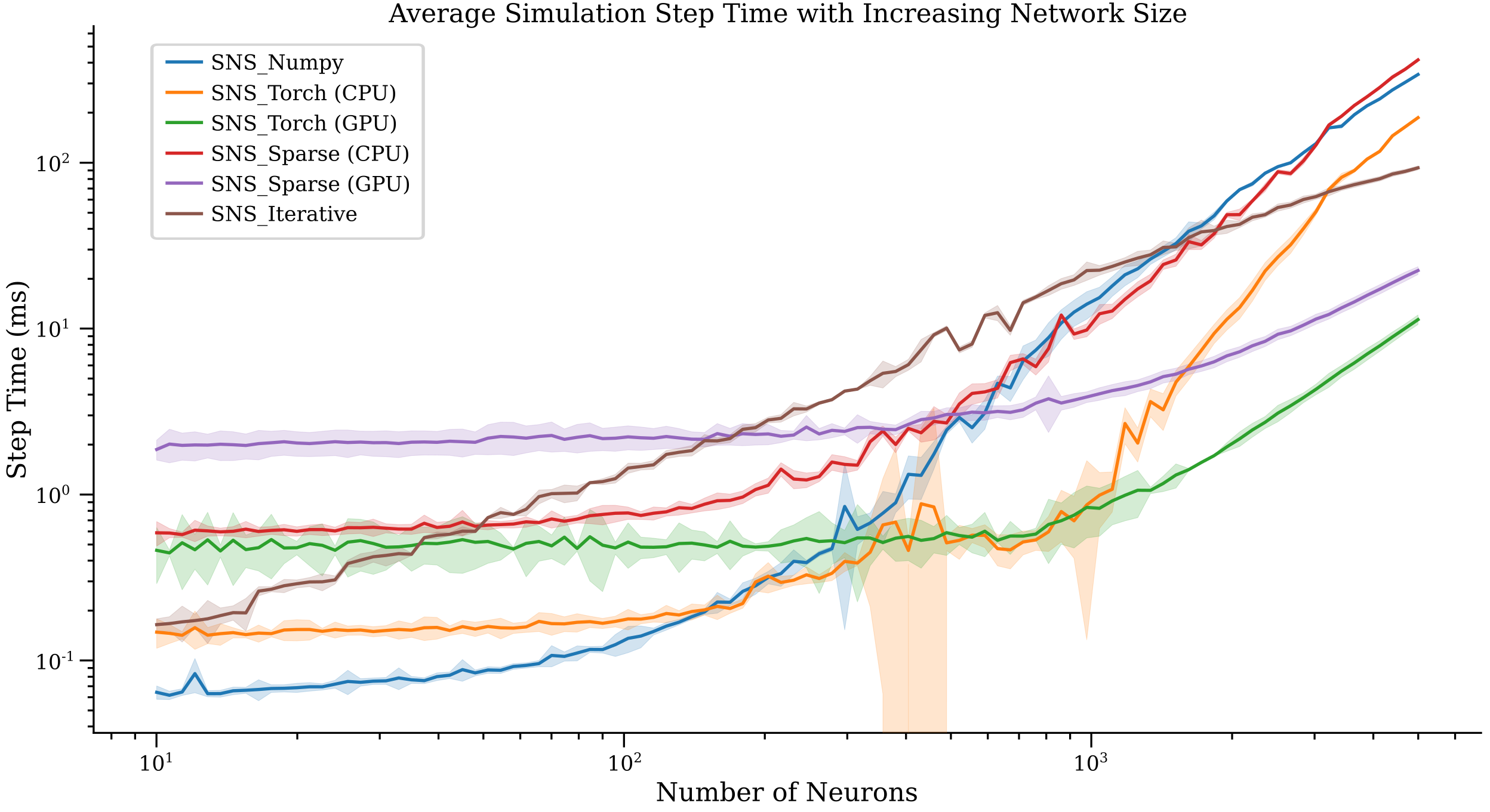
Based on experimentation, here are some general recommendations for networks with a roughly 1:1 comparison between the number of neurons and synapses:
for small networks (under ~300),
SNS_NumpyandSNS_Torch(CPU version) will execute the fastest.Networks with 300-7000 neurons will execute the fastest using
SNS_Torchand a CUDA-compatible GPU.Networks with 7000-11000 neurons will execute the fastest using
SNS_Sparseand a CUDA-compatible GPU.For networks with over 11000 neurons, due to memory constraints the simple iterative
SNS_Manualbackend is the best option.
Additionally, due to constraints with memory access and architecture, each of these backends has a maximum possible network size before the host system runs out of memory. These examples are given below:
If you run a simulation and find conflicting empirical performance data, please email the project maintainer and our documentation may be updated.
SNS_Numpy
SNS_Numpy simulates networks using the numpy python package. All parameters are
stored in np.ndarray objects. Build this backend with the following command:
model = net.compile(backend='numpy')
Note that SNS_Numpy only supports execution on the CPU.
SNS_Torch
SNS_Torch simulates using PyTorch. All parameters are stored in torch.Tensor
objects. SNS_Torch networks can be simulated on either the CPU or a CUDA-enabled GPU. To simulate on the CPU,
build the network as
model = net.compile(backend='torch', device='cpu')
For GPU simulation, use
model = net.compile(backend='torch', device='cuda')
or for machines with multiple GPUs
model = SNS_Torch(net, device='cuda:i')
where i is the index of the desired GPU.
SNS_Sparse
SNS_Sparse simulates using PyTorch Sparse.
All parameters are specified as torch.Tensor objects, then stored in torch.sparse_coo_tensor objects.
SNS_Sparse networks can be simulated on either the CPU or a CUDA-enabled GPU. To simulate on the CPU,
build the network as
model = net.compile(backend='sparse', device='cpu')
For GPU simulation, use
model = net.compile(backend='sparse', device='cuda')
or for machines with multiple GPUs
model = net.compile(backend='sparse', device='cuda:i')
where i is the index of the desired GPU.
Due to the process of building sparse tensors and matrices, SNS_Sparse networks take longer to compile than the
other backends. For improved performance, loading of a pre-built network may improve performance. See
Saving and Loading Networks
for more information.
SNS_Iterative
NOTE: This backend will not be updated to incorporate any neural or synaptic models added after version 1.5.0. As such, it is not recommended for new models.
The SNS_Iterative backend implements the same neural dynamics as the other backends, but does so using iterative
operations instead of vectors and matrices. Its primary purpose is as a benchmarking comparison for the vector-based
algorithms, however can be useful for extremely large and sparse networks which exceed the memory constraints of other
backends.
All parameters are stored in np.ndarray objects. This backend can be built with the following command:
model = net.compile(backend='iterative')
Note that SNS_Iterative only supports execution on the CPU.